← Inside LookFor — how the pipeline works
Shadow Brain · small apps track · architecture design
LookFor Architecture
The structural views of the app: what it talks to, what it's made of, where the
bits live, and how a cold start and a search actually unfold. Every diagram is rendered from the
PlantUML sources in docs/architecture/, which describe the shipped code — the
numbers in them are the real constants from the source.
C4 · level 1
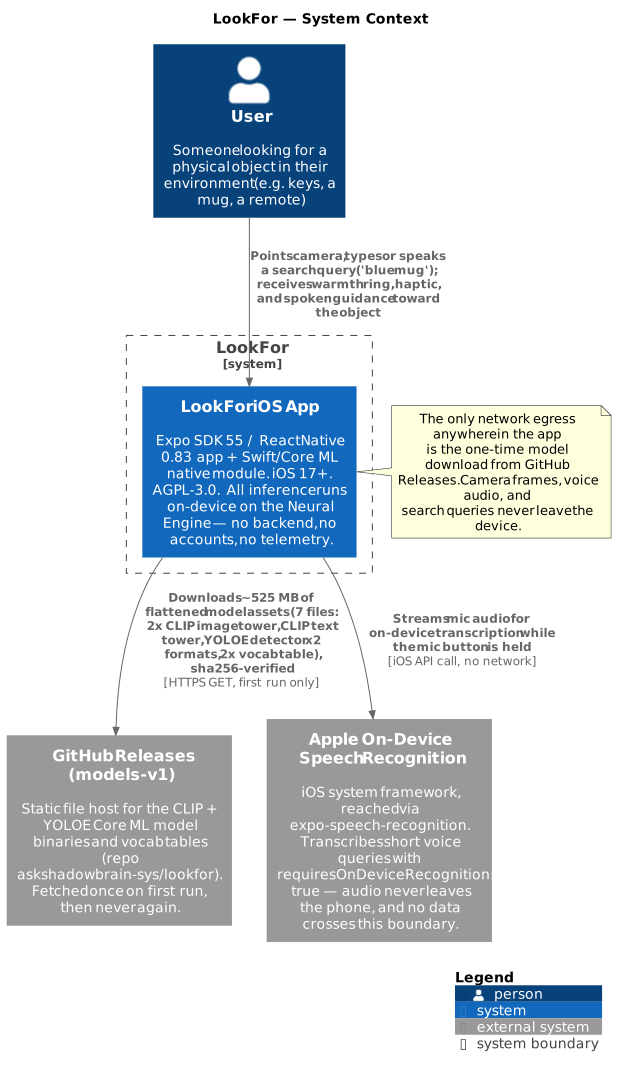
Context — the app and the outside world
The widest view, and the shortest list you'll ever see on a C4 diagram: the user, the app, and the only two external systems LookFor ever touches — GitHub Releases, contacted once to download the ML models on first run, and Apple's on-device speech recogniser, which despite being an OS service never sends audio off the phone. There is no backend, no account system, no analytics endpoint. This is the architecture-level proof behind the App Store privacy label "Data Not Collected".
C4 · level 2
Containers — five things inside the app
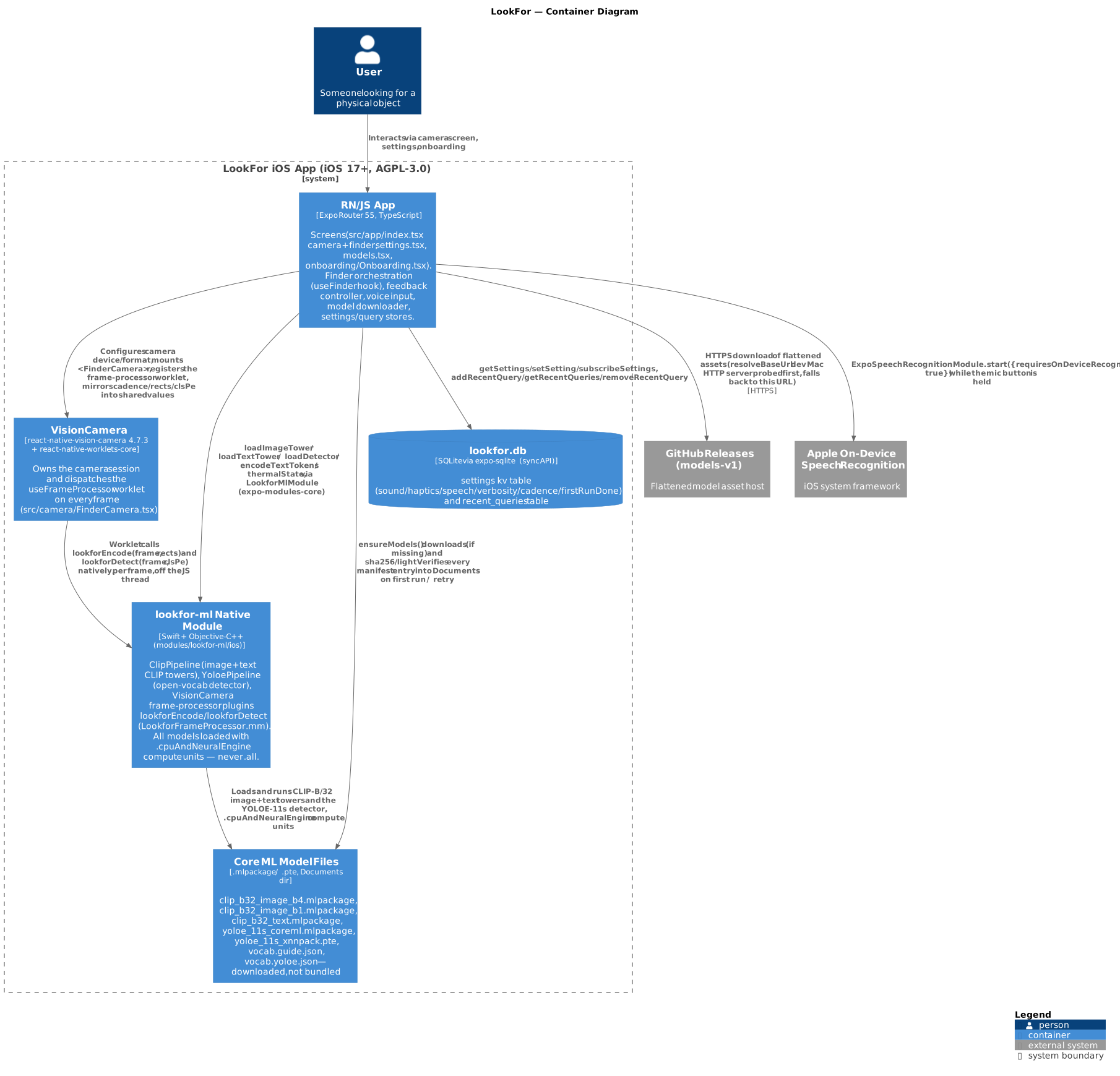
One level down, the app splits into five containers with hard boundaries between them:
① the React Native / JS app (Expo Router screens plus the finder orchestration — all the decisions); ② VisionCamera, which owns the camera session and hands frames to native code; ③ the lookfor-ml native module (Swift + Core ML — all the inference); ④ the Core ML model files on disk in the app's Documents directory, downloaded on first run; and ⑤ the SQLite database for settings, recent queries, and the model manifest.
The load-bearing boundary is between ① and ③: camera pixels flow only Camera → native module, and only 512-float embeddings and small box arrays cross into JavaScript. Nothing image-sized ever crosses the JS bridge — that single rule is what makes a 4–8 Hz loop possible in a React Native app.
C4 · level 3
Components — inside the finder
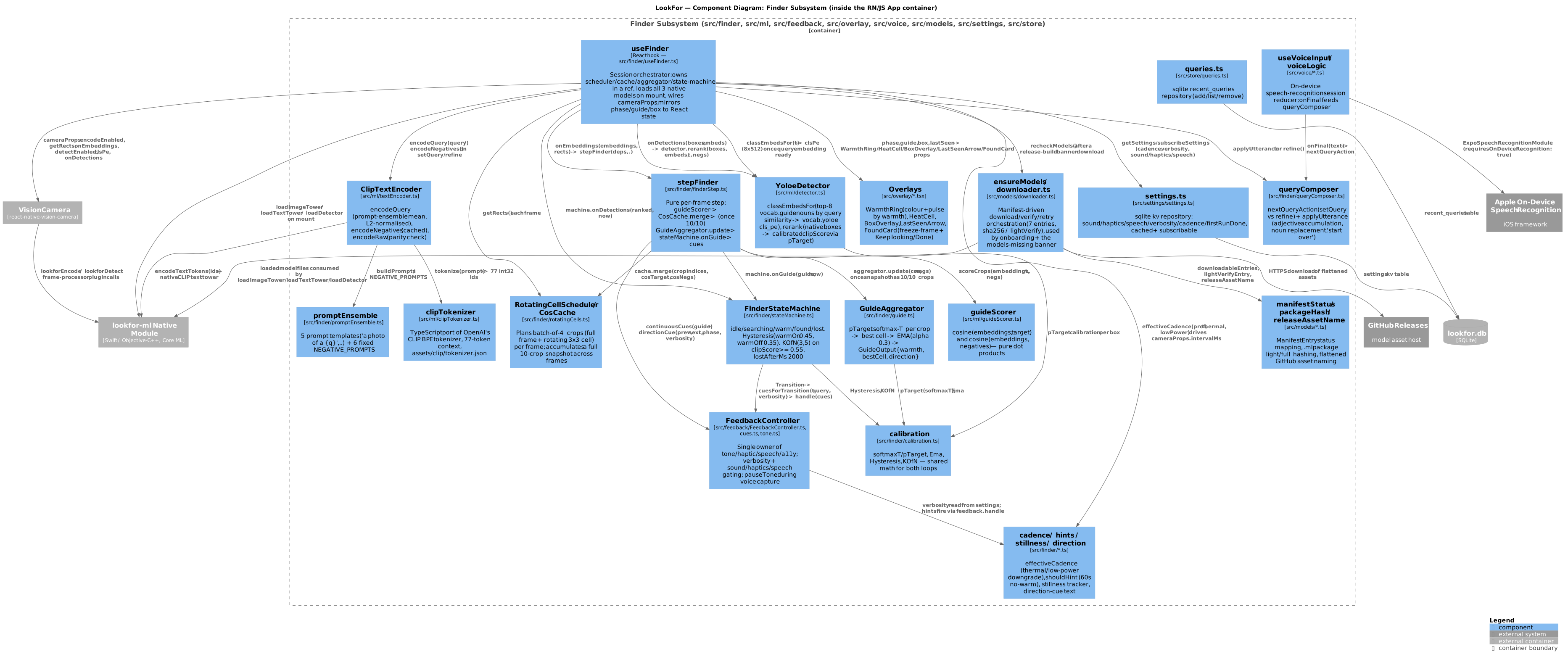
The RN/JS container opened up into its real modules. The two loops from the
pipeline page appear here as code: the guide loop
(rotatingCells planning crops, guideScorer scoring them,
GuideAggregator smoothing into warmth) and the confirm loop
(YoloeDetector + re-rank). Around them sit the state machine that owns the
phase, the single FeedbackController that owns everything sensory, the overlay views,
voice input, and the model downloader. Arrows show who calls whom — note that overlays and
feedback only consume state-machine output; nothing reaches back into the scoring path.
src/finder, src/ml, src/feedback, src/overlay.full size ↗ · c4-component.pumldata shapes
Entities — everything persisted or passed around
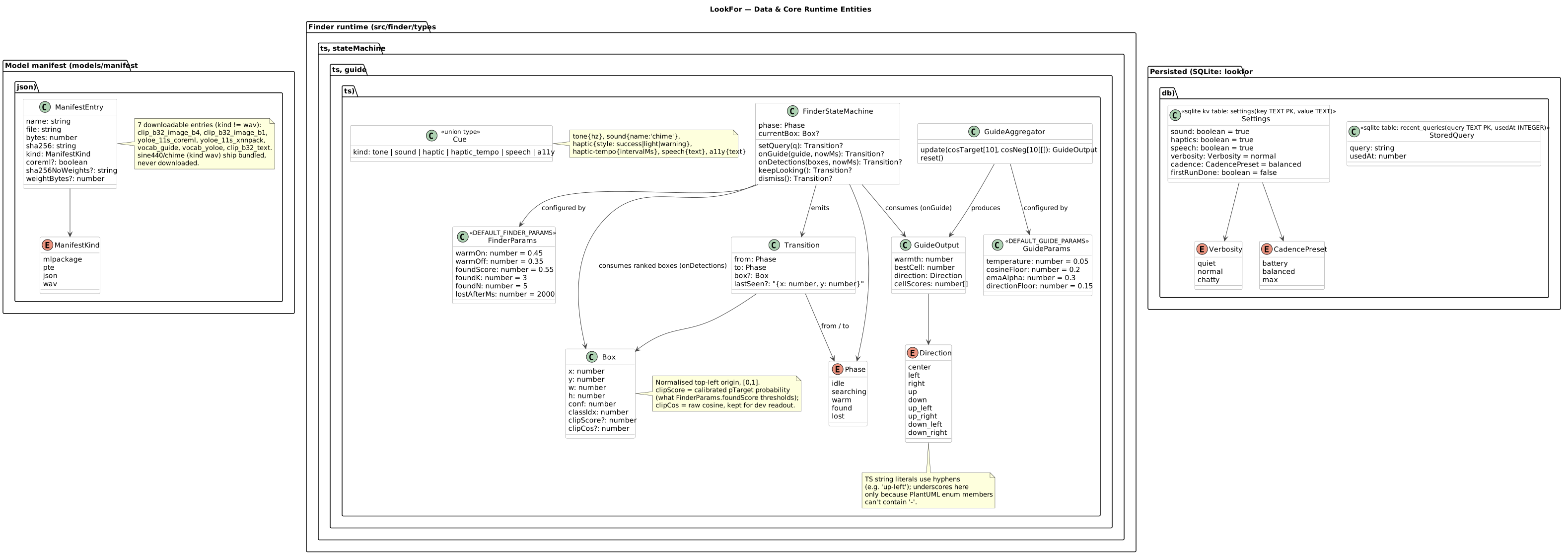
The app's whole data model fits on one diagram. Persisted in SQLite: Settings
and StoredQuery (the last-10 recents). On disk beside the models:
ManifestEntry, which drives the download/verify loop. The rest are the finder's
runtime types — FinderParams, GuideParams, GuideOutput,
Box, Transition, Phase, Direction,
Cue — shown with their real default values. One subtlety the diagram calls out
explicitly: the confirm loop's clipScore is the calibrated softmax probability
(pTarget), not the raw CLIP cosine (clipCos) — mixing those
up is the classic way to misread the thresholds.
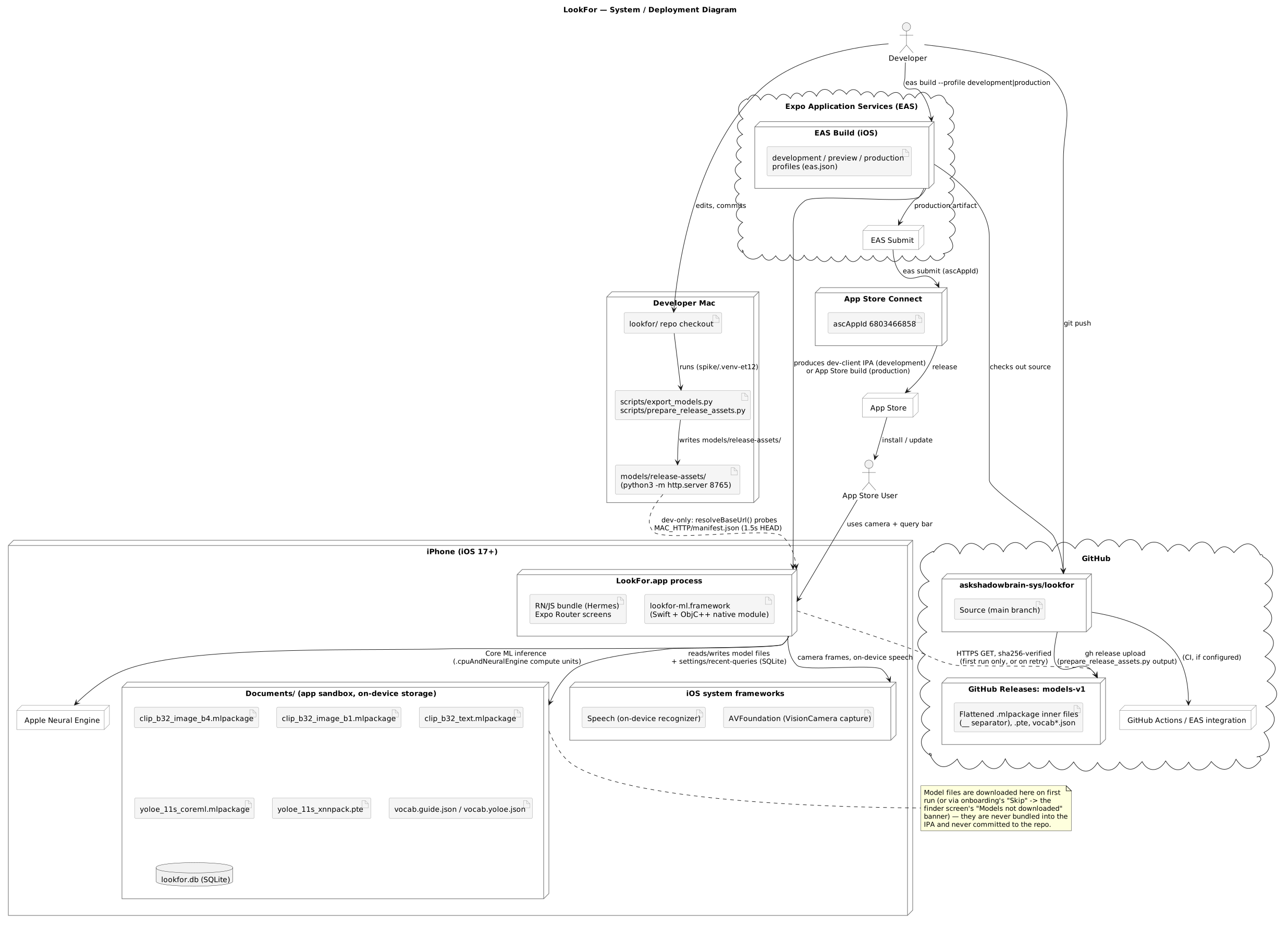
deployment
System — where the bits live and move
The physical view: on the iPhone, the app process, the Neural Engine it dispatches
to, the Documents directory holding the downloaded .mlpackages, and the SQLite
file. Off the phone: the GitHub repo and its Releases (the model CDN), the EAS
build-and-submit pipeline, and App Store distribution. The diagram also shows the
dev-only loop — a Mac running http.server over
models/release-assets/ so a development build can pull models over local Wi-Fi
without waiting on a GitHub release.
sequence · cold start
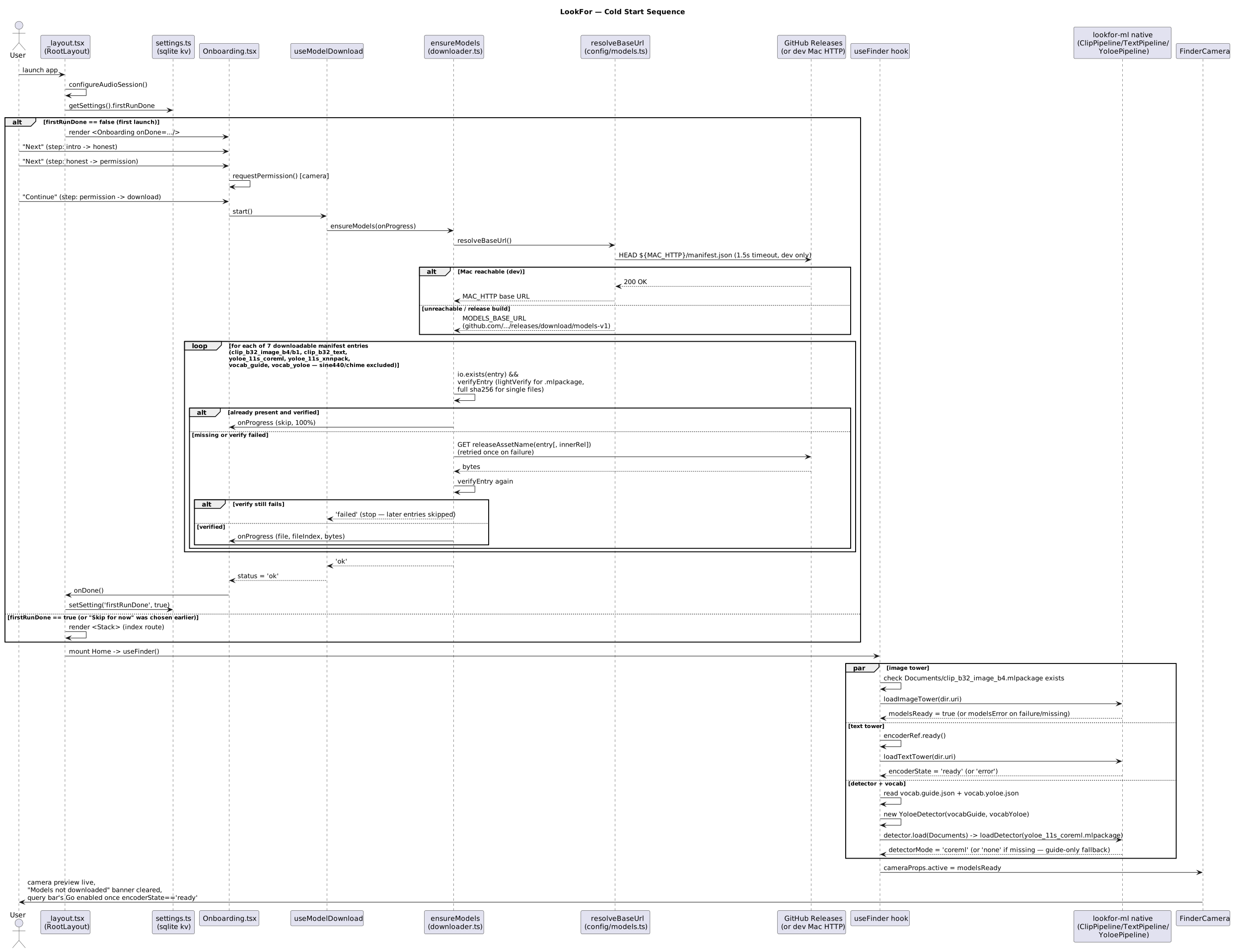
Cold start — from tap to live camera
What happens between tapping the icon and seeing the viewfinder. The firstRunDone
gate decides whether onboarding runs (three honest-copy cards, then the camera permission).
ensureModels walks the manifest entry by entry — download if missing, SHA-256
verify, re-download on mismatch — and then the three native models (image tower, text tower,
detector) load in parallel before the camera goes live. On later launches the whole
left half of the diagram collapses to a manifest check.
sequence · a search
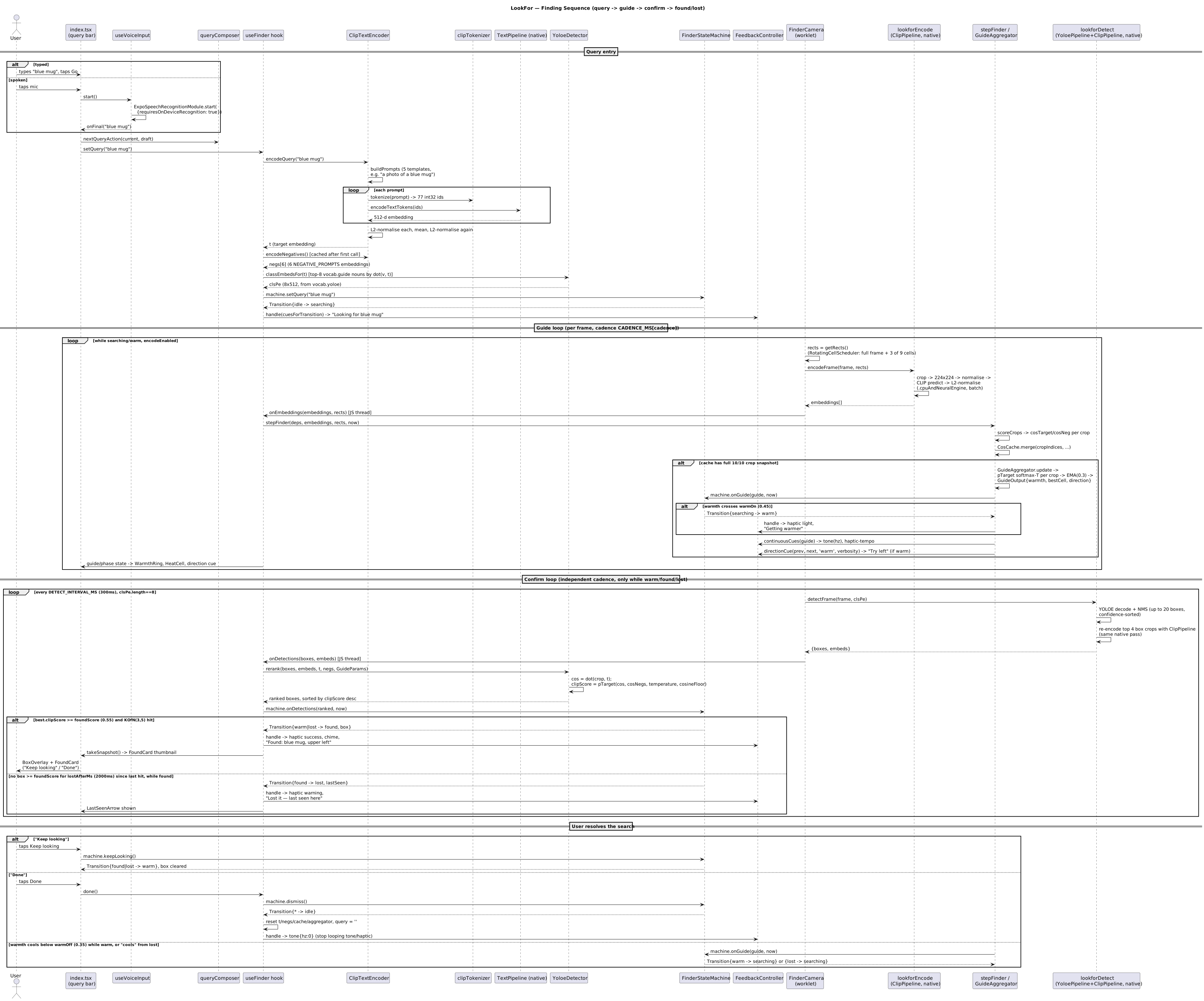
A full search — the pipeline as a timeline
The same story the pipeline page tells stage by stage, drawn as actual call
order: query entry (typed or voice) → text encoding → the per-frame guide loop
(rotating-cell scoring → warmth EMA → hysteresis) → once warm, the confirm loop (native YOLOE
detect → CLIP re-rank → the 3-of-5 vote) → found and lost feedback → the user resolving with
Keep looking or Done. This is the diagram to read next to
src/finder/finderStep.ts — the lifelines map one-to-one onto the modules in the
component view above.
ground truth
The constants these diagrams bake in
Every threshold shown above is a real constant in the source, not an illustration. The convention in the repo: if one of these changes, the diagrams are updated in the same PR.
| Constant | Value | Meaning | Defined in |
|---|---|---|---|
warmOn | 0.45 | warmth needed to enter warm (wakes the confirm loop) | stateMachine.ts |
warmOff | 0.35 | warmth below which warm falls back to searching (hysteresis gap) | stateMachine.ts |
foundScore | 0.55 | calibrated re-rank probability a box must beat | stateMachine.ts |
foundK / foundN | 3 / 5 | frames the vote requires before declaring found | stateMachine.ts |
lostAfterMs | 2000 | box absence that flips found → lost | stateMachine.ts |
temperature | 0.05 | softmax τ over [target, negatives] cosines | replay.ts |
cosineFloor | 0.2 | absolute cosine below which warmth is suppressed (empty-scene guard) | replay.ts |
emaAlpha | 0.3 | EMA weight for the warmth signal | replay.ts |
directionFloor | 0.15 | minimum cell score before a direction cue is offered | replay.ts |
From DEFAULT_FINDER_PARAMS in
src/finder/stateMachine.ts and DEFAULT_GUIDE_PARAMS in
src/finder/replay.ts. The interactive demos on the pipeline
page run these same values.